
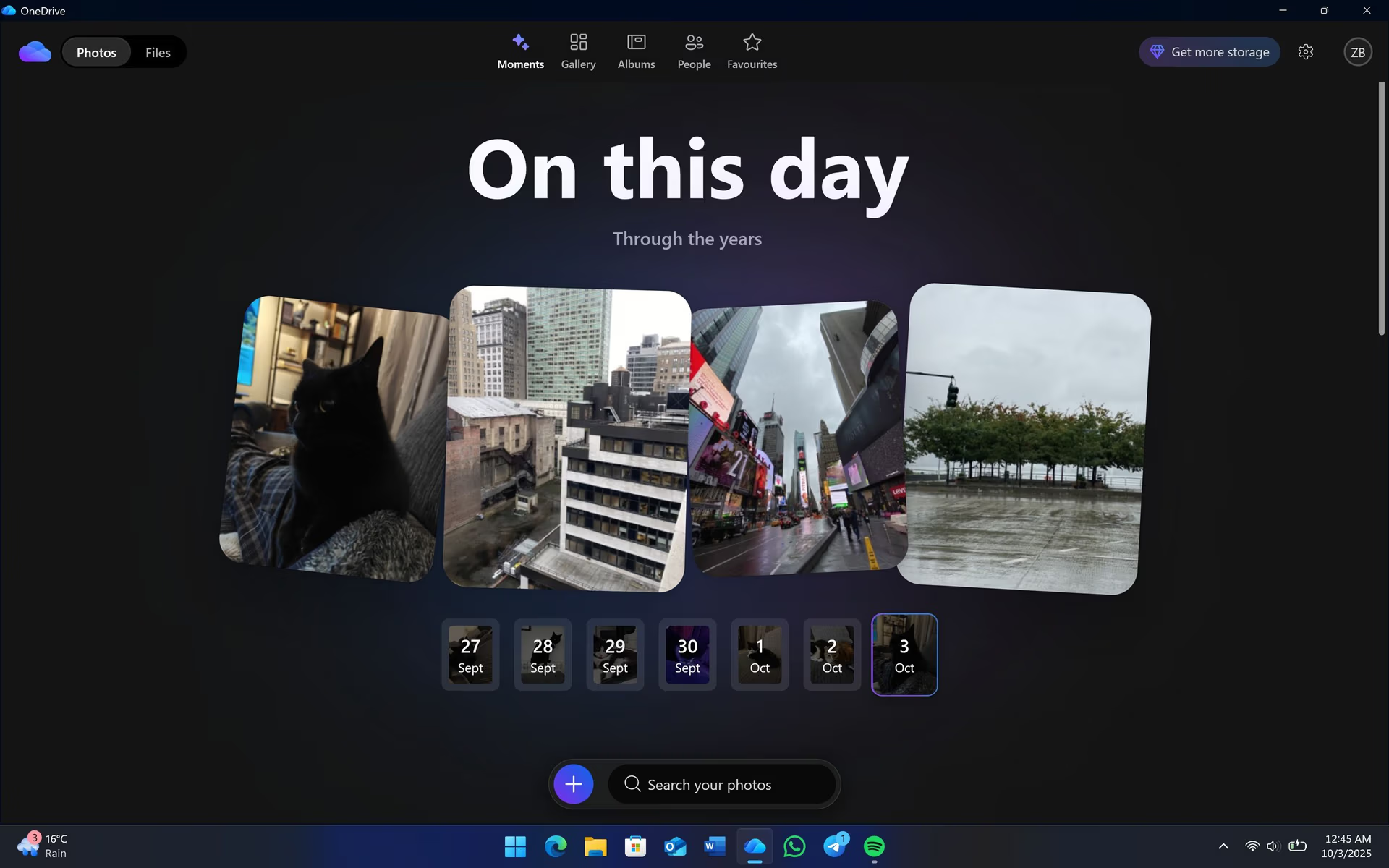
Decoupling the Cloud: Why Windows 11’s Upcoming Dedicated OneDrive App is More Than Just a New Icon
The news is out, and it’s a quiet revolution brewing beneath the surface of Windows 11. Leaks suggest that Microsoft is working on a brand-new, dedicated OneDrive application, set to debut possibly in 2025. While a “new app” might sound like a minor update in the grand scheme of things, for those of us who live and breathe productivity in the digital realm, this could signify a profound shift in how we interact with our cloud storage and, indeed, with Windows itself.
For years, OneDrive has been the quiet workhorse of Windows, seamlessly integrated into File Explorer. It’s been there, syncing our documents, photos, and files, often so unobtrusively that we almost forget it’s a distinct service. It’s a “set it and forget it” utility, a background process that just *works*. This deep integration has certainly offered unparalleled convenience, making cloud storage feel like an extension of local disk space, a feature many users have come to rely on implicitly.

However, this very convenience, this deep integration, has also limited OneDrive’s potential, often relegating it to little more than a fancy network drive. It has lacked the distinct identity and feature set that dedicated cloud storage applications offer, leaving advanced capabilities dormant or poorly exposed within the File Explorer context. This impending change isn’t just a re-skin; it’s a fundamental re-evaluation of OneDrive’s role in the Microsoft ecosystem and for the Windows 11 user experience.
The current iteration of OneDrive, while functional, often means accessing its more advanced features requires navigating through multiple context menus or even visiting the web interface. This fragmented experience can hinder productivity and prevent users from fully leveraging the robust capabilities that OneDrive already possesses, let alone those it could develop. A dedicated application has the potential to unify these features, making them intuitively accessible and significantly enhancing the overall utility of Microsoft’s cloud storage solution.
From Utility to Destination: The Promise of a Dedicated App
So, what does a dedicated OneDrive app truly mean for the future of Windows 11 and our daily workflows? It’s about elevating OneDrive from a simple file synchronization utility to a full-fledged cloud destination. Instead of merely being a background process that mirrors local folders to the cloud, it transforms into a powerful hub where users actively go to manage, interact with, and derive value from their digital assets. This shift is crucial for positioning OneDrive as a central player in a cloud-first world, offering an experience that transcends basic file management.
Enhanced User Experience & Feature Richness
Imagine a central hub for all your cloud files that goes far beyond the basic folder structure of File Explorer. A dedicated app could offer a truly modern and intuitive interface, designed from the ground up to maximize the potential of cloud storage. This isn’t just about showing files; it’s about providing powerful tools to interact with them, transforming how we engage with our documents, photos, and media. The current File Explorer integration, while convenient for basic tasks, simply cannot provide the richness and depth that a purpose-built application can deliver.
Advanced Search and Filtering: Forget the basic name-based search of File Explorer. A dedicated OneDrive app could revolutionize how we find information. Imagine searching not just by filename, but by actual content within documents, by metadata like creation date, modification date, or even the people shared with. AI-powered categorization could allow searches like “all presentations about marketing from last quarter” or “all photos from my summer vacation 2023.” This intelligent search capability would save countless hours, making it effortless to locate specific digital assets within an ever-growing cloud library.
Intuitive Media Galleries: File Explorer is not designed for media management. A dedicated OneDrive app could feature a beautiful, responsive media gallery, presenting photos and videos in an engaging visual layout. Think AI-powered tagging (faces, locations, objects), automatic album creation, and even basic photo and video editing tools (crop, rotate, filters) directly within the app. Sharing options would be streamlined, allowing one-click sharing to social media, creation of shareable albums, or even easy casting to other devices, vastly improving the photo and video experience.
Robust Sharing Controls: Managing shared files can be a headache, especially in a collaborative environment. A dedicated app would offer a centralized, intuitive interface for all sharing controls. Users could easily view who has access to which files, modify permissions on the fly, set expiry dates for shared links, and even track download activity. Granular controls, such as allowing view-only access, restricting downloads, or requiring passwords for sensitive shares, would be readily available, providing peace of mind and significantly enhancing security for your cloud storage.
Version History and Collaboration at a Glance: For those working on important documents, accessing previous file versions is critical. A dedicated app could make this process seamless, displaying a clear timeline of changes and easily allowing rollbacks or comparisons. Furthermore, it could offer real-time insights into ongoing collaborative edits, showing who is currently working on a document, what changes they’ve made, and facilitating communication around those changes, all without diving deep into context menus or external applications. This streamlines teamwork and enhances productivity for shared projects.
Activity Feeds: Imagine a personalized dashboard within the app showing a chronological feed of all relevant cloud activity. This could include recent changes to shared documents, new comments on files, items shared with you, files uploaded by team members, and even notifications about expiring share links or storage quotas. This ‘pulse’ of your cloud activity would transform OneDrive into a central command center for your digital life, ensuring you’re always informed about what matters most across all your digital assets.
Microsoft’s Strategic Shift
This move isn’t just about user convenience; it’s a significant strategic play for Microsoft. It reflects a deeper understanding of modern cloud computing trends and Microsoft’s ambition to maintain its competitive edge in a rapidly evolving digital landscape. By investing in a standalone OneDrive app, Microsoft is making a powerful statement about the service’s future importance.
Elevating OneDrive as a Core Service: By giving OneDrive its own dedicated app, Microsoft is clearly positioning it to compete more directly and robustly with established cloud giants like Google Drive, Dropbox, and Apple’s iCloud. It’s a statement that OneDrive isn’t just a Windows feature; it’s a powerful, cross-platform cloud platform deserving of its own identity and robust feature set. This elevation also aims to foster greater user loyalty and encourage deeper integration with the broader Microsoft 365 ecosystem, establishing OneDrive as a cornerstone of personal and business productivity.
Decoupling Services from the OS: This could be part of a larger trend where Microsoft makes core services more independently updateable and feature-rich, reducing reliance on the Windows update cycle for major feature enhancements. This means faster innovation, more agile development, and quicker bug fixes for OneDrive. By detaching it from the operating system, Microsoft gains the flexibility to iterate rapidly, rolling out new features and improvements without being tied to the often slower, more complex Windows update schedule. This also enables more consistent experiences across Windows, web, and mobile platforms.
A Foundation for AI Integration: A dedicated app provides a much richer and more flexible canvas for integrating advanced AI capabilities. File Explorer’s interface simply isn’t conducive to the kind of complex, interactive AI features that modern cloud services demand. Imagine AI suggesting optimal file organization based on your usage patterns, automatically summarizing lengthy documents, or proactively flagging important information from your shared files. This dedicated environment is ripe for integrating cutting-edge AI features, potentially including tight integration with Microsoft 365 Copilot, transforming OneDrive from a storage solution into an intelligent personal assistant for your digital assets. This could range from smart search refinements to context-aware content suggestions, truly elevating the user experience.
The Future is Fluid and Cloud-First
Looking ahead, a dedicated OneDrive app could be a cornerstone of a more fluid, cloud-first Windows experience. This strategic evolution blurs the lines between local and cloud storage even further, not by making the cloud invisible, but by making it incredibly powerful, accessible, and central to the user’s workflow. It’s about giving users the choice: the familiar File Explorer for local files and deeply integrated system files, and a robust, feature-rich OneDrive app for managing their expansive digital lives directly in the cloud.
This approach acknowledges that while local storage remains important, the future of data management increasingly lies in accessible, secure, and highly functional cloud platforms. A dedicated OneDrive app positions Microsoft at the forefront of this shift, offering users a comprehensive and powerful tool to manage their digital assets, collaborate seamlessly, and leverage intelligent features that will enhance productivity and creativity.
Ultimately, this isn’t just about a new icon appearing in your Start menu or a minor software update. It’s about Microsoft embracing a future where our data lives where it’s most accessible, most secure, and most powerful – and that’s increasingly in the cloud. The dedicated OneDrive app for Windows 11 could be a pivotal moment, shaping how we store, share, and truly utilize our digital assets for years to come, profoundly impacting both personal and professional workflows. It represents a significant commitment to evolving OneDrive into a world-class cloud storage and productivity platform.
Read the original story at Windows Central.
What specific feature are you most excited to see in a dedicated OneDrive app, and how do you think it will change your daily workflow?